 Stacklog
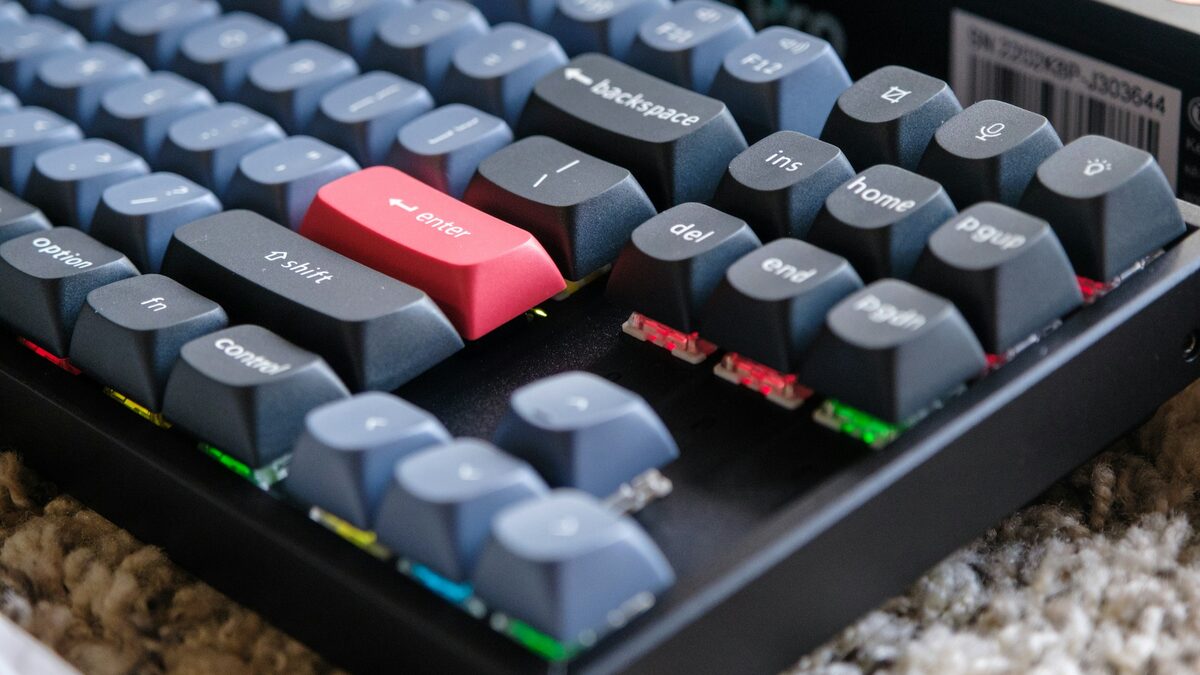
Every few months a coworker who's never thought about their keyboard asks why I have three different ones on my desk, and every few months I give some version of the same twenty-minute explanation. This is that explanation, written down once so I can just send the link.
If you type for eight-plus hours a day, your keyboard is one of maybe three pieces of hardware that touches your body constantly during work, alongside your chair and your monitor height. It's worth understanding even if you never build a custom board, because switch choice changes typing fatigue more than almost anything else in your setup, and most people buying a "mechanical keyboard" off a shelf have no idea which switch is even inside it.
The short version: every mechanical switch falls into one of three families based on what happens as you press it down, and those three families explain nearly everything people argue about online.
The three switch families
- Linear — the stem moves straight down with no bump and no click. Smooth, quiet-ish, and the choice most gamers prefer because there's no feedback event to interrupt rapid presses.
- Tactile — there's a distinct bump partway down the keypress that you feel but don't hear as a separate sound. This is the "I can feel when the key registered" category, and it's what most serious typists end up preferring once they've tried a few.
- Clicky — a tactile bump plus an audible click, usually from a separate piece of plastic inside the switch that snaps against the housing. Loved by people who type in a home office alone, tolerated by nobody else in an open floor plan.
What actuation force and travel distance actually mean
Two numbers show up on every switch spec sheet, and almost nobody outside the hobby knows what they mean in practice:
Actuation force, measured in grams, is how hard you have to press before the keypress registers. Lighter switches (35-45g) feel effortless but can cause accidental presses if you rest your fingers on the keys; heavier switches (60-80g) require deliberate pressure, which some people find reduces fatigue over long sessions because you're not fighting unconscious resting weight.
Total travel distance is how far the key moves from resting position to fully bottomed out, usually around 4mm for standard switches. Shorter-travel switches (used in low-profile boards) reduce finger movement over a day of typing, which adds up more than it sounds like it should across tens of thousands of keystrokes.
A few switches worth trying
If you want to actually feel the difference instead of just reading about it, most hobby vendors sell small switch tester kits with eight to twelve switches on a little plastic base for $15-25 — genuinely the best way to spend an afternoon figuring out your preference before committing to a full keyboard. Three switches that come up constantly as reasonable starting points:
- Gateron Pro Yellow — a smooth, mid-weight linear switch, a common factory default on budget-to-midrange boards and a fair baseline for comparison.
- Cherry MX Brown — the most common tactile switch in office keyboards, mild bump, quiet enough for shared spaces, often the one people don't realize they already own.
- Boba U4 (tactile) — a hobbyist favorite with a rounder, more pronounced bump than Cherry Browns; worth trying if Browns felt too subtle to notice.
Stabilizers and keycaps change more than people expect
Switch choice gets all the attention, but two other components shape how a board feels nearly as much. Stabilizers are the small wire-and-housing assemblies under your longer keys — space bar, shift, enter — and cheap, unlubricated stock stabilizers are the single biggest reason a board with great switches can still sound rattly and inconsistent. Clip-modding and lubing stabilizers is a smaller, less tedious job than lubing every switch, and it's often the higher-leverage fix if your board sounds "clacky" in a bad way rather than a satisfying way.
Keycap material matters too, though less than people in hobby forums sometimes insist. PBT plastic resists the shiny, worn look that ABS keycaps develop after a year or two of oil from your fingers, and it tends to have a slightly deeper, less hollow sound profile. None of this changes how a switch actuates underneath, but it changes what you hear and feel at the surface, which is most of what you're actually aware of while typing.
Low-profile and optical switches: a different category entirely
Everything above assumes a standard mechanical switch on a standard-height board, but it's worth knowing two other categories exist. Low-profile switches, used in slimmer boards aimed at people who want a laptop-like typing height with mechanical feel, trade some of the tactile distinctness of a full-height switch for reduced finger travel — a real ergonomic consideration if you're typing for ten hours a day and every millimeter of vertical movement adds up across tens of thousands of keystrokes. Optical switches, which use a light beam interrupted by the stem instead of physical metal contacts to register a keypress, are mostly marketed on faster actuation for competitive gaming; for ordinary typing work the difference is imperceptible, and I wouldn't choose a board based on that spec alone.
Lubing and modding: when it's worth the effort
If your board runs custom firmware like QMK or VIA — common on hobbyist boards, less common on prebuilt office keyboards — you can also adjust actuation-adjacent behavior in software, which sometimes smooths out a slightly inconsistent switch without touching anything physical. A snippet from a typical QMK keymap, just to show the shape of it:
// keymap.c — layer 0, relevant row
[0] = LAYOUT(
    KC_ESC,  KC_Q,  KC_W,  KC_E,  KC_R,  KC_T,
    KC_TAB,  KC_A,  KC_S,  KC_D,  KC_F,  KC_G,
    KC_LSFT, KC_Z,  KC_X,  KC_C,  KC_V,  KC_B
)
Switches almost always sound and feel better with a small amount of lubricant applied to the moving parts, which reduces the scratchy friction you get from factory tolerances. It's a genuinely tedious process — ten to fifteen minutes per switch with a tiny brush, times eighty-plus switches on a full board — and I wouldn't recommend it unless you already enjoy fiddly manual tasks as a form of relaxation. If you don't, buying pre-lubed switches from a vendor that offers that service as an add-on is worth the extra few cents per switch.
What I actually use, and why it doesn't matter much
I type on tactile switches at a medium weight (around 55g) on my main board, and linear on a smaller board I use for anything resembling gaming. Neither choice is objectively correct, and the single most common mistake I see is someone agonizing over switch choice for weeks when almost any reasonable mechanical switch is a dramatic upgrade over a laptop keyboard or a cheap membrane board. Get a tester kit, try a dozen switches for twenty minutes, pick whichever one you keep wanting to press again. That's the whole method.