 Stacklog
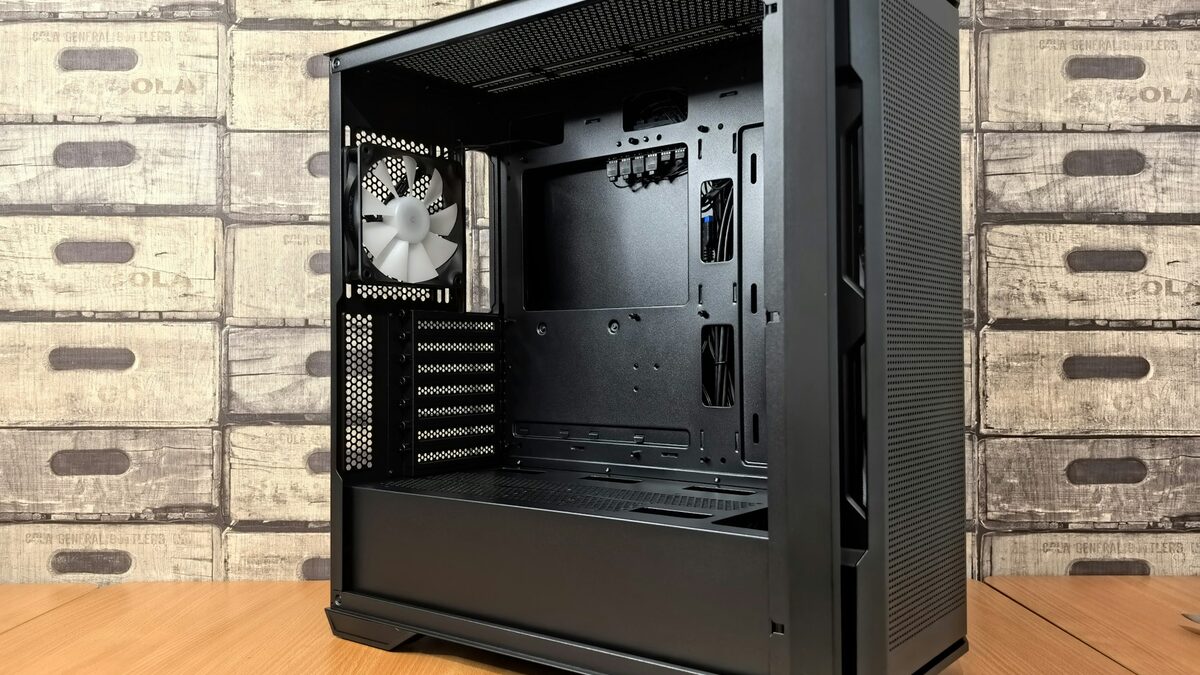
My previous NAS was a four-bay Synology that sounded like a small aquarium pump and ran out of room two years before I finally replaced it. I wanted the new one to do three things: hold six drives, stay under 30dB measured from a meter away, and cost less over five years than renewing a vendor's app ecosystem. Here's exactly what I bought, what it cost, and what I'd change.
This isn't a sponsored build — I bought every part myself at the prices below, from three different retailers, over about two weeks of waiting for a case restock. If you're trying to decide whether a NAS like this is worth it compared to a prebuilt box, the short answer is: yes, if you already enjoy building PCs, and probably not if you don't, because the hours matter.
Total build cost came to $1,142 before drives, or $1,842 once you add six 8TB drives. That's more upfront than a prebuilt four-bay unit, but it has twice the storage ceiling and runs quieter than anything in that price bracket.
The parts list, and what each one cost
| Part | Model | Price |
|---|---|---|
| Case | Fractal Design Node 804 | $139 |
| Motherboard | ASRock Rack B650D4U | $329 |
| CPU | AMD Ryzen 5 8500G | $169 |
| RAM | 32GB DDR5 ECC UDIMM | $118 |
| Boot/cache SSD | 1TB NVMe (mirrored pair) | $96 |
| HBA card | LSI 9207-8i (used, tested) | $58 |
| CPU cooler | Noctua NH-L9a | $45 |
| Case fans | 3x Noctua NF-A14 (swapped stock fans) | $75 |
| PSU | Corsair SF600 Platinum | $113 |
| Drives (6x 8TB) | Seagate Exos 7E10 | $700 |
The HBA card is the one part I'd tell you to buy new rather than used unless you can test it before paying — a flaky SAS card produces drive errors that look exactly like failing drives, and chasing that down cost me a weekend on the first attempt.
What actually made it quiet
Three things mattered more than anything else, in order:
- Fan swap. The case ships with decent fans, but swapping all three for Noctua NF-A14s and running them at the lowest fan curve the motherboard allows dropped the idle noise by what felt like half, even though it's probably closer to 4-5dB. Perceived loudness and measured dB don't move together.
- Drive isolation. The Node 804's drive cage has rubber grommets on the mounting screws by default, but I added an extra layer of sorbothane pads under the cage itself, which killed most of the low-frequency hum that was transmitting into the desk.
- No fan on the HBA. Some SAS controllers ship with a tiny screaming fan on the chip. Mine didn't need one once it had airflow from the case fans, so I never installed one — check your card's thermal specs before assuming you need active cooling on it.
Measured with a cheap sound meter app at one meter, idle noise sits around 24dB — genuinely quiet, close to room-noise-floor in a normal house at night.
Software: TrueNAS Scale over the alternatives
I run TrueNAS Scale rather than Unraid or a bare Debian + ZFS setup. I considered all three seriously. Unraid is the easier on-ramp and its array flexibility (mixed drive sizes) is genuinely nice, but it's a $59-$129 one-time license depending on pool size, and TrueNAS Scale's ZFS implementation is more mature for snapshots and replication, which is the feature I actually use daily. If you've never managed ZFS before, budget a weekend to understand vdevs before you create a pool — mistakes at that step are expensive to undo.
How it behaves under real load, not just idle
Idle noise is the number everyone quotes, but idle isn't where a NAS actually spends time behaving badly. During a scrub (ZFS checking every block on every drive for errors, which I run monthly) or a large file transfer, all six drives spin and seek simultaneously, and the noise profile shifts from a faint hum to an audible clicking chatter from the drives themselves — not the fans, the drives. That's physics I can't engineer around with better fans; it's just what six spinning platters sound like under sustained random I/O. The scrub itself is scheduled with a one-line cron entry rather than anything fancier:
# crontab -e
0 2 1 * * /sbin/zpool scrub tank
Scrubs run at 2 a.m. on the first of the month for exactly this reason, and the box is back to its quiet idle state well before anyone in the house is awake to notice.
What I'd change if I did it again
- I'd buy the case fans with the build instead of swapping them after — it's the same money either way, but I wasted an install cycle.
- I'd go with 10TB drives instead of 8TB. The per-terabyte price difference was smaller than I expected, and I'm already at 70% capacity eight months in.
- I'd skip the mirrored NVMe boot pair and just use one drive with a good backup of the config — the mirror added complexity I haven't once needed.
Is it worth it versus buying a Synology or QNAP
If your priority is "turn it on and never think about it again," buy the prebuilt. The vendor ecosystems (Synology's DSM especially) are polished in a way that a hand-built box with TrueNAS never quite matches for a non-technical user. But if you're reading a blog about building your own NAS, you already know which category you're in. For me, the deciding factor was the HBA card and expansion slots — I can add a 10-gigabit NIC or a second HBA later without replacing the whole chassis, which no four-bay consumer NAS lets you do.
Ongoing costs
Power draw at idle is about 38 watts, which at my local electricity rate works out to roughly $4.50/month running 24/7. Add occasional drive replacements (I'm budgeting for one failure a year across six drives, at current Exos pricing that's about $115/year) and the five-year total cost of ownership lands well under what five years of a prebuilt NAS plus its subscription add-ons would cost, especially once you factor in that this one can be upgraded instead of replaced.